iOS-UDID-Safari:经 Safari 获取 iOS 真实 UDID 原文标题:shaojiankui/iOS-UDID-Safari
内容概要总结
GitHub 仓库 shaojiankui/iOS-UDID-Safari(MIT,723 star、288 fork,Java,2017 创建、2024-08 最后更新;README 明确标注「不能上架 Appstore」)。仓库提供一套通过 Safari 与 .mobileconfig 描述文件获取 iOS 设备真实 UDID 的方案,并给出 PHP、Java 服务端与 iOS 本地服务器三种实现。原理与步骤:在 Web 服务器创建 .mobileconfig(XML plist)描述文件,其中 PayloadContent 配置回调 URL 与 DeviceAttributes(UDID、IMEI、ICCID、VERSION、PRODUCT);用户通过点击安装该描述文件;设备安装后会把含 UDID/IMEI/PRODUCT/VERSION 的 XML plist POST 到配置的回调地址,服务端解析后展示或回跳 App。README 强调要点:mobileconfig 需设 Content-Type 为 application/x-apple-aspen-config;接收端必须用 301 重定向,否则提示「无效的描述文件」;描述文件可签名。该通过 mobileconfig 获取 UDID 的机制已被 Apple 废弃,本文具历史参考价值。
原文内容(原文即中文)
You signed in with another tab or window. Reload to refresh your session.
You signed out in another tab or window. Reload to refresh your session.
You switched accounts on another tab or window. Reload to refresh your session.
Dismiss alert
Latest commit
History
Folders and files
| Name | Name |
|---|
iOS-UDID-Safari-LocalServer/iOS-UDID-Safari
iOS-UDID-Safari-LocalServer/iOS-UDID-Safari
Repository files navigation
iOS-UDID-Safari
iOS-UDID-Safari,通过Safari获取iOS设备真实UDID,use sarari and mobileconfig get ios device real udid
博文地址 :www.skyfox.org/safari-ios-device-udid.html
通过Safari与mobileconfig获取iOS设备UDID(设备唯一标识符)
科普:U D I D (Unique Device Identifier),唯一标示符,是iOS设备的一个唯一识别码,每台iOS设备都有一个独一无二的编码,UDID其实也是在设备量产的时候,生成随机的UUID写入到iOS设备硬件或者某一块存储器中,所以变成了固定的完全不会改变的一个标识,用来区别每一个唯一的iOS设备,包括 iPhones, iPads, 以及 iPod touches
随着苹果对程序内获取UDID封杀的越来越严格,私有api已经获取不到UDID,Mac地址等信息,继而出现了使用钥匙串配合uuid等等方法变相实现
由于近期项目需求是设备授权的形式使用软件,使用钥匙串等方法不完全能解决问题,因为重置或重做系统都会清除uuid然后重新存入,所以想到了用safari的方式获取设备真实的UDID
一、通过苹果Safari浏览器获取iOS设备UDID步骤
苹果公司允许开发者通过IOS设备和Web服务器之间的某个操作,来获得IOS设备的UDID(包括其他的一些参数)。这里的一个概述:
- 在你的Web服务器上创建一个.mobileconfig的XML格式的描述文件;
- 用户在所有操作之前必须通过某个点击操作完成.mobileconfig描述文件的安装;
- 服务器需要的数据,比如:UDID,需要在.mobileconfig描述文件中配置好,以及服务器接收数据的URL地址;
- 当用户设备完成数据的手机后,返回提示给客户端用户;
二、.mobileconifg
在这篇文章中,主要讲如何获得标识符。其实还可以获取更多信息,以下是一个获得UDID示例.mobileconfig配置
<!--参考:https://developer.apple.com/library/ios/documentation/NetworkingInternet/Conceptual/iPhoneOTAConfiguration/ConfigurationProfileExamples/ConfigurationProfileExamples.html-->
<?xml version="1.0" encoding="UTF-8"?>
<!DOCTYPE plist PUBLIC "-//Apple//DTD PLIST 1.0//EN" "http://www.apple.com/DTDs/PropertyList-1.0.dtd">
<plist version="1.0">
 <dict>
 <key>PayloadContent</key>
 <dict>
 <key>URL</key>
 <string>http://dev.skyfox.org/udid/receive.php</string> <!--接收数据的接口地址-->
 <key>DeviceAttributes</key>
 <array>
 <string>UDID</string>
 <string>IMEI</string>
 <string>ICCID</string>
 <string>VERSION</string>
 <string>PRODUCT</string>
 </array>
 </dict>
 <key>PayloadOrganization</key>
 <string>dev.skyfox.org</string> <!--组织名称-->
 <key>PayloadDisplayName</key>
 <string>查询设备UDID</string> <!--安装时显示的标题-->
 <key>PayloadVersion</key>
 <integer>1</integer>
 <key>PayloadUUID</key>
 <string>3C4DC7D2-E475-3375-489C-0BB8D737A653</string> <!--自己随机填写的唯一字符串,http://www.guidgen.com/ 可以生成-->
 <key>PayloadIdentifier</key>
 <string>dev.skyfox.profile-service</string>
 <key>PayloadDescription</key>
 <string>本文件仅用来获取设备ID</string> <!--描述-->
 <key>PayloadType</key>
 <string>Profile Service</string>
 </dict>
</plist>
你需要填写回调数据的URL和PayloadUUID。该PayloadUUID仅仅是随机生成的唯一字符串,用来标识唯一
注意:mobileconfig下载时设置文件内容类型Content Type为:application/x-apple-aspen-config
HTTPS服务器上的文件
当访问mobileconfig文件不能直接下载时,可能就需要设置mime content type了,application/x-apple-aspen-config,
<IfModule mod_mime.c>
 AddType application/x-apple-aspen-config .mobileconfig
</IfModule>
//读取文件流为$mobileconfig
header('Content-type: application/x-apple-aspen-config; chatset=utf-8');
header('Content-Disposition: attachment; filename="company.mobileconfig"');
echo $mobileconfig;三、iOS设备安装.mobileconfig描述文件
新建一个用于下载mobileconfig的网页,这里我命名为udid.php
如果需要单独处理文件流,而不是根据文件路径直接下载文件, href="udid.mobileconfig",需要经过动态语言拦截后返回文件流
<!DOCTYPE html>
<html xmlns="http://www.w3.org/1999/xhtml">
<head>
<meta http-equiv="Content-Type" content="text/html; charset=utf-8" />
 <meta content="width=device-width, initial-scale=1.0, minimum-scale=1.0, maximum-scale=1.0,user-scalable=no" name="viewport" id="viewport" />
<title>获取您的UDID</title>
<body>
<div id="content">
UUDI:<input style="" name="" value="$udid" />
<a class="buttons" href="udid.mobileconfig" target="_blank">1.点击获取您的UDID</a>
<a class="buttons" href="yourapp://?function=valid&uuid=$udid">2.验证ipa</a>
</div>
</body>
</html>yourapp为应用提前设置的URL Schemes(查看自定义 URL Scheme 完全指南)
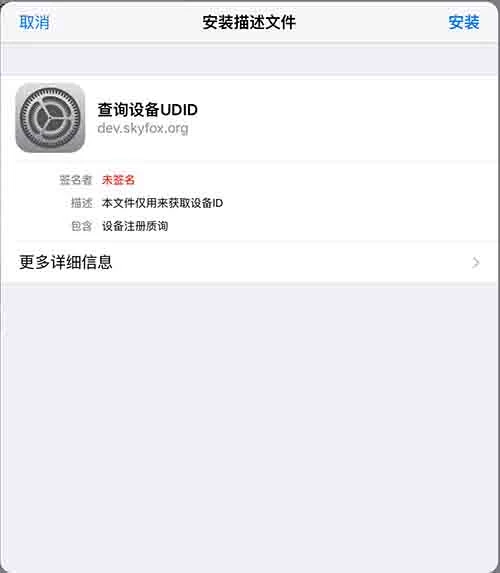
下面的界面就是用户通过浏览器点击开始安装时的界面,用户点击“Install/安装”开始安装,下面的mobileconfig文件是没有签名的,所以会显示“Unsigned/未签名”红色提示,并且安装的时候还会多出一部警告界面;点击查看:为iOS的mobileconfig文件进行签名
四、服务器接收返回数据并显示
设置好mobileconfig文件中的URL,并且下载安装mobileconfig之后,iOS设备会POST XML数据流给你的mobileconfig文件,PayloadContent节点中设置的URL。
<!DOCTYPE plist PUBLIC "-//Apple//DTD PLIST 1.0//EN" "http://www.apple.com/DTDs/PropertyList-1.0.dtd">
 <plist version="1.0">
 <dict>
 <key>IMEI</key>
 <string>12 123456 123456 7</string>
 <key>PRODUCT</key>
 <string>iPhone8,1</string>
 <key>UDID</key>
 <string>b59769e6c28b73b1195009d4b21cXXXXXXXXXXXX</string>
 <key>VERSION</key>
 <string>15B206</string>
 </dict>
 </plist>
<?php
$data = file_get_contents('php://input');
//这里可以进行xml解析
//header("Location: http://dev.skyfox.org/udid?data=".rawurlencode($data)); //有人说必须得目录形式才会安装成功
header('HTTP/1.1 301 Moved Permanently'); //这里一定要301跳转,否则设备安装会提示"无效的描述文件"
header("Location: http://dev.skyfox.org/udid/index.php?".$params);
?>protected void doPost(HttpServletRequest request, HttpServletResponse response) throws ServletException, IOException {
response.setContentType("text/html;charset=UTF-8");
request.setCharacterEncoding("UTF-8");
//获取HTTP请求的输入流
InputStream is = request.getInputStream();
//已HTTP请求输入流建立一个BufferedReader对象
BufferedReader br = new BufferedReader(new InputStreamReader(is,"UTF-8"));
StringBuilder sb = new StringBuilder();
//读取HTTP请求内容
String buffer = null;
while ((buffer = br.readLine()) != null) {
sb.append(buffer);
}
String content = sb.toString().substring(sb.toString().indexOf("<?xml"), sb.toString().indexOf("</plist>")+8);
//content就是接收到的xml字符串
//进行xml解析即可
String udid =
response.setStatus(301); //301之后iOS设备会自动打开safari浏览器
response.setHeader("Location", "http://192.168.1.106:8080/udid.jsp?UDID="+udid);
//http://192.168.1.106:8080/udid.jsp 是用于显示udid的页面,也可以利用之前的下载mobileprofile文件页面
}<?php
$UDID = $_GET['UDID'] ? $_GET['UDID'] : $_POST['UDID'];
?>
UDID:<input style="width:300px;" name="" value="<?php echo $UDID;?>" />**值得注意的是重定向一定要使用301重定向,有些重定向默认是302重定向,这样就会导致安装失败,设备安装会提示"无效的描述文件
**
源码说明
- iOS-UDID-Safari-LocalServer文件夹为使用iOS内置服务器作为服务端获取UDID,有点小bug
参考链接:
http://www.joshwright.com/tips/getting-an-iphone-udid-from-mobile-safari
https://discussions.apple.com/thread/3089948?start=0&tstart=0
About
iOS-UDID-Safari,(不能上架Appstore!!!)通过Safari获取iOS设备真实UDID,use safari and mobileconfig get ios device real udid
Resources
Stars
Watchers
Forks
Releases
Packages
Contributors
Languages
You can’t perform that action at this time.