JA4+ 网络指纹(FoxIO 官方博客) 原文标题:JA4+ Network Fingerprinting - FoxIO | Cyber Innovation
内容概要总结
本文是 FoxIO 的 John Althouse 于 2023 年 9 月发布 JA4+ 网络指纹体系的官方博客,是 JA4 算法的一手来源。文章提出用模块化、人机可读的 JA4+ 指纹取代 2017 年的 JA3 TLS 指纹标准,所有 JA4+ 指纹采用 a_b_c 格式以支持按 ab/ac/c 局部检索。文中逐一介绍:JA4(TLS 客户端指纹,基于 Client Hello,支持 TCP/QUIC,并显示 ALPN)、JA4S(TLS 服务器/会话指纹,同 Client Hello 必得同 Server Hello)、JA4H(HTTP 客户端指纹,JA4H_ab 识别应用、JA4H_c 识别网站/Cookie、JA4H_d 识别用户且可规避记录 SPII 以符合 GDPR)、JA4L(轻量距离定位,用首几个包的延迟以微秒计测距离,用 TTL 推算跳数与初始 TTL,附距离公式与光速常数 0.128 英里/µs)、JA4X(X509 证书生成方式指纹,能识别 Cobalt Strike/Sliver/Havoc/SoftEther 等)、JA4SSH(SSH 会话指纹,默认每 200 包滚动,用包长与 ACK 方向区分正向/反向 shell 与 SCP)。文章给出用例(威胁狩猎、会话劫持防护、DDoS 检测、位置三角定位等)与许可说明(JA4 为 BSD 3-Clause,其余为 FoxIO License 1.1,除变现外宽松)。
翻译内容
原文内容(English)
本文中我将介绍新的 JA4+ 网络指纹方法,以及它们能够检测出什么。
John Althouse
2023 年 9 月 26 日
TL;DR
本文中我将介绍新的 JA4+ 网络指纹方法,以及它们能够检测出什么。
JA4+ 提供了一套模块化的网络指纹,易于使用、易于分享,取代了 2017 年的 JA3 TLS 指纹标准。这些方法既可被人阅读也可被机器读取,有助于更有效地进行威胁狩猎与分析。这些指纹的用例包括:扫描威胁行为者、恶意软件检测、会话劫持防护、合规自动化、位置追踪、DDoS 检测、威胁行为者分组、反弹 shell 检测,以及更多。
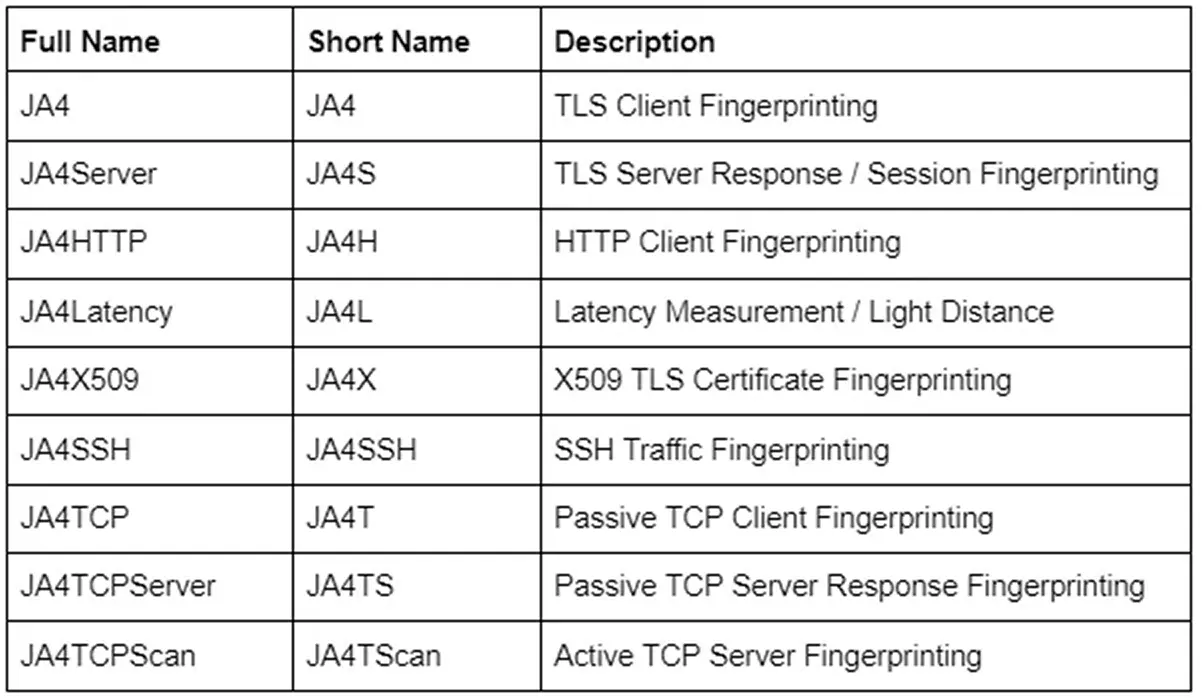
更多指纹正在开发中,将在发布后加入 JA4+ 家族。
更新:点击此处查看 JA4T/S/Scan —— TCP 指纹博客。
JA4+ 可在此获取:https://github.com/FoxIO-LLC/ja4
什么是 JA4+
JA4+ 是一组针对多种协议的简单而强大的网络指纹,既可被人阅读也可被机器读取,有助于改进威胁狩猎与安全分析。如果你不熟悉网络指纹,我建议你阅读我发布 JA3 的博客(此处)、JARM 的博客(此处),以及 Fastly 这篇关于 TLS 指纹现状的优秀博客,它概述了上述这些方法的来龙去脉及其问题。JA4+ 提供专门的支持,随着行业变化让方法保持最新。此外,应广大需求,一个官方的 JA4+ 指纹数据库(包含关联应用程序与推荐检测逻辑)正在构建中。
所有 JA4+ 指纹都采用 a_b_c 格式,用以界定构成指纹的不同部分。这样可以只用 ab 或 ac 或仅用 c 来进行狩猎与检测。如果某人只想分析进入其 App 的 Cookie,就只需看 JA4H_c。这种新的保留局部性的格式有助于进行更深、更丰富的分析,同时保持简单、易用,并允许可扩展性。
在本文中,我们发布 JA4/S/H/L/X/SSH,简称 JA4+。更多指纹正在开发中,将在发布后加入 JA4+ 家族。
JA4:TLS 客户端指纹
TLS 用于加密互联网上的绝大多数流量,从网页浏览到流媒体,再到 IoT 使用分析。甚至恶意软件也用 TLS 来隐藏其恶意通信。在 TLS 连接开始时,客户端发送一个 TLS Client Hello 包,它是在加密通信之前以明文发送的。该包由客户端应用程序生成,告知服务器它支持哪些密码套件以及它偏好的通信方式。因此,TLS Client Hello 包对每个应用程序或其底层 TLS 库而言是独特的。
JA4 着眼于这个 TLS Client Hello 包,构建出一个易于理解、易于分享的指纹。格式如下:

无论流量是通过 TCP 还是 QUIC 传输,JA4 都能对客户端进行指纹识别。QUIC 是新的 HTTP/3 标准所用的协议,它将 TLS 1.3 封装进 UDP 包中。由于 QUIC 由 Google 开发,如果某个组织大量使用 Google 产品,QUIC 可能占到其网络流量的一半,因此捕获它很重要。
JA4 还清楚地显示 ALPN(应用层协议协商,Application-Layer Protocol Negotiation)。它表示应用程序希望在 TLS 协商完成后用来通信的协议。"h2" = HTTP/2,"h1" = HTTP/1.1,"dt" = DNS-over-TLS,等等。此处可找到可能的 ALPN 完整列表。此处的 "00" 表示缺少 ALPN。请注意,ALPN 为 "h2" 并不表示就是浏览器,因为许多 IoT 设备也通过 HTTP/2 通信。然而,缺少 ALPN 可能表示该客户端不是 Web 浏览器。
有关实现以及原始(未哈希)指纹长什么样,更多技术细节可在 GitHub 页面找到。
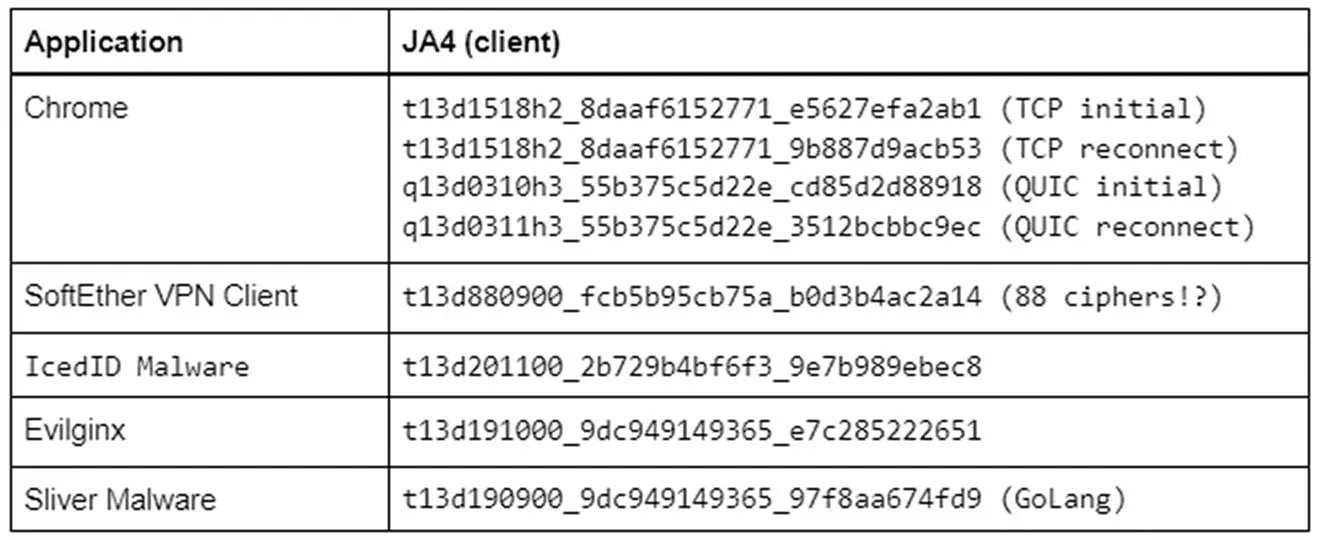
即使流量通过 TLS 1.3 加密,我们仍能获得关于客户端应用程序的大量有价值信息。请记住,大多数自定义应用程序都会带有其底层 TLS 库的指纹。因此用 Go 编写的程序很可能拥有与其他 Go 程序相同的 JA4。Python、Java 等也是如此,而 VPN 客户端、Steam、Slack 和 Windows 函数等自定义程序则会是独特的。
在应用程序基本静态的生产网络中,JA4 可能极具价值。如果你运行的是全 Linux 基础设施,那么出现一个 Windows 的 JA4 指纹就值得关注。如果你只运行 Exchange 服务器,那么突然出现一个 Python 的 JA4 指纹就值得关注。当试图理解网络流量时,JA4 是一个很好的分析支点,而 a_b_c 格式允许更深入的分析。
例如,GreyNoise 是一个识别互联网扫描者的互联网监听器,正在将 JA4+ 实现进其产品。他们发现有一个行为者用不断变化的单一 TLS 密码套件扫描互联网。这会生成大量完全不同的 JA3 指纹,但用 JA4 时,只有 JA4 指纹的 b 部分会变化,a 和 c 部分保持不变。因此,GreyNoise 可以通过查看 JA4_ac 指纹(拼接 a+c,丢弃 b)来追踪该行为者。
JA4S:TLS 服务器/会话指纹
客户端发送其 TLS Client Hello 包之后,服务器会以其 TLS Server Hello 包回应。该包同样以明文发送,是基于服务器从 Client Hello 中的可用选项里做出的选择而构造的。这包括从可用选项列表中选中的那一个密码套件,以及服务器希望设置的任何扩展。
因此,Server Hello 对服务器应用程序和发给它的那个 Client Hello 而言都是独特的。不同的 Client Hello 可能导致来自同一服务器的不同 Server Hello,因而产生不同的 JA4S。然而,同一个 Client Hello 从该服务器应用程序那里总会产生同一个 Server Hello。例如,如果客户端发送 JA4=a_b_c,服务器以 JA4S=d_b_e 回应,那么该服务器对 a_b_c 将总是以 d_b_e 回应。但如果另一个应用程序向同一服务器发送不同的 client hello,比如 JA4=x_y_z,服务器将以不同的 server hello 回应,即 JA4S=t_y_v。所以,对不同应用程序的回应不同,但对同一应用程序的回应总是相同。我在我的 JA3S 博客文章中对此有更详细的阐述。

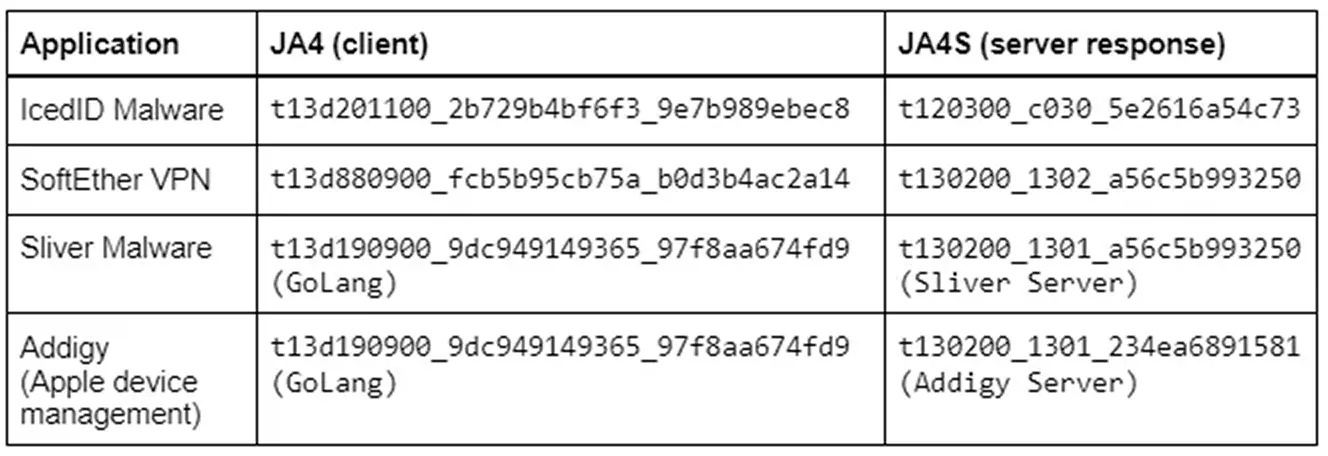
示例 JA4 与 JA4S 组合
JA4S 与 JA4 结合时,会显著提高检测保真度。从仅仅识别客户端的底层库,提升到识别客户端或恶意软件家族。除应用程序识别之外,还可以只看 JA4S_b 来了解任一给定网络上正在使用哪些密码套件,以确保其满足合规要求。所有这些都无需破解加密即可实现。
JA4H:HTTP 客户端指纹
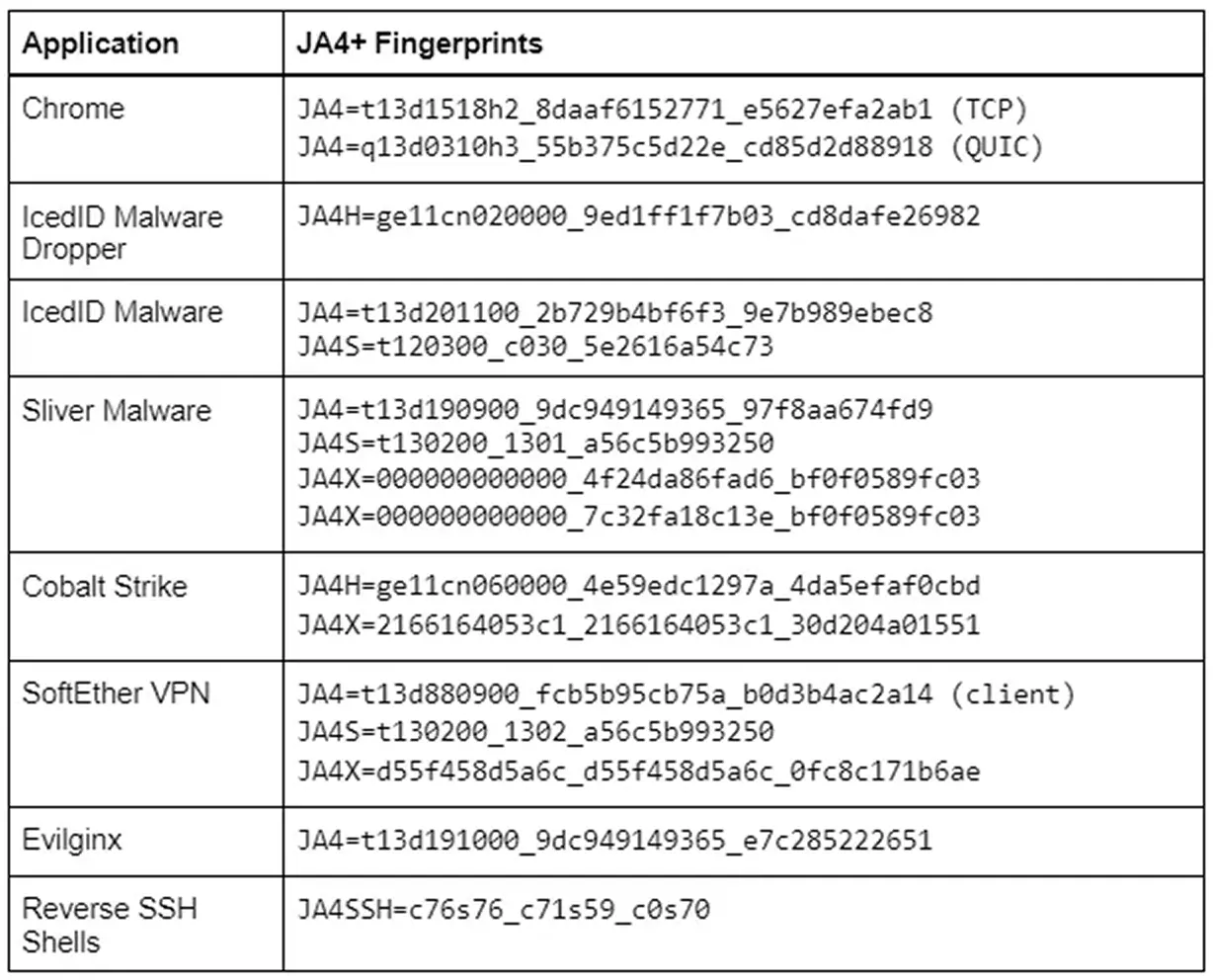
JA4H 基于每个 HTTP 请求对 HTTP 客户端进行指纹识别。由于大多数流量都加密,JA4H 最适合在服务器、代理、WAF、TLS 终结型负载均衡器,以及 TLS 被解密的环境中使用。然而,即使在 TLS 未解密的环境中,JA4H 仍然有价值,因为许多设备和程序(包括恶意软件)仍通过 HTTP 通信。例如,IcedID 恶意软件投放器就不使用 TLS。这些恶意程序非常容易指纹识别。

JA4H_ab 是对给定 HTTP 方法下应用程序的指纹。缺少 Accept-Language 清楚地表明该应用程序不是人机交互的,因此是机器人(bot)。
JA4H_c 是 Cookie 的指纹,对访问的每个网站都不同,但对那个网站或应用程序是相同的。例如,每个 Plex 服务器或 Okta 服务器都会产生相同的 JA4H_c。
JA4H_d 是用户的指纹,会因用户而异。这样就可以在不记录 SPII(敏感个人信息)的情况下追踪用户浏览网站,从而使日志系统符合 GDPR。
有关技术实现的更多细节可在我们的 GitHub 找到。
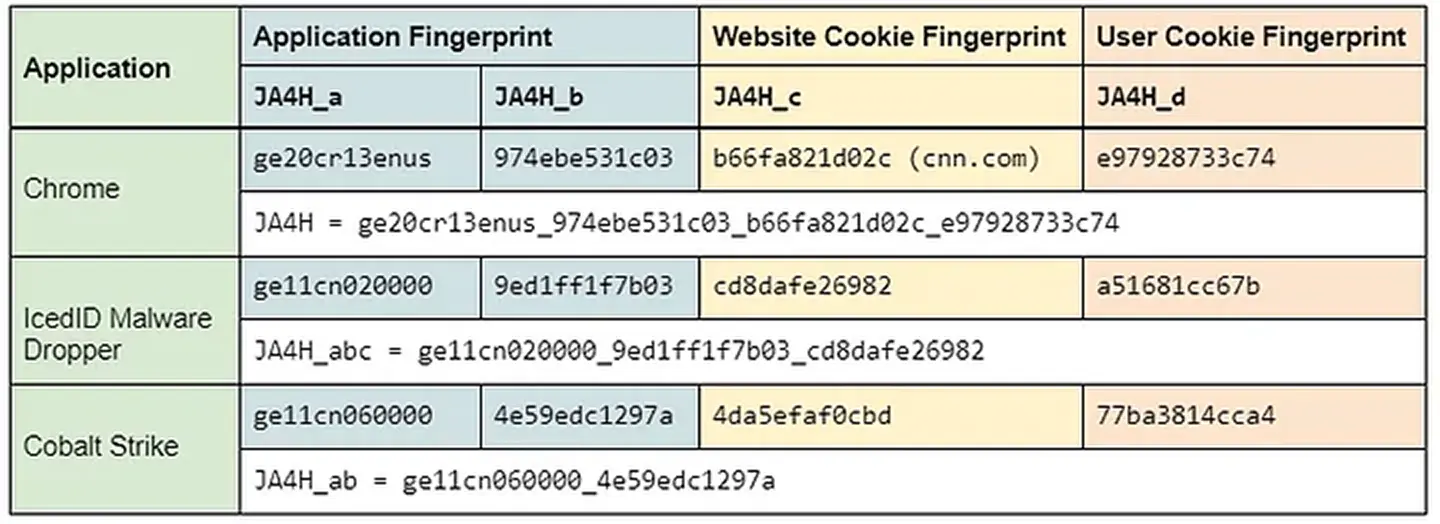
在服务器端,可以把 JA4H_c 用作一种狩猎方法。由于服务器规定了客户端应使用哪些 Cookie 字段,所有客户端都应具有相同的 JA4H_c。此处的差异值得深入调查。还可以用 JA4H_d 追踪用户,用 JA4H_ab 追踪其客户端应用程序,或仅用 JA4H_ab 识别机器人。
在客户端侧(代理、NDR、零信任),JA4H 与 JA4 和 JA4S 结合可实现极高保真度的应用程序与恶意软件检测。
JA4H 有很多用例,尤其是与 JA4+ 其余部分结合时。我将在之后的博客文章中更详细地介绍所有这些用例。
JA4L:轻量距离定位(Light Distance Locality)
JA4L 通过查看一次连接中最初几个包之间的延迟,来测量客户端与服务器之间的距离。我们使用最初几个包,是因为它们是低层机器生成的,创建和发送这些包几乎没有处理延迟。时间以微秒(µs)计量,1ms = 1000µs,因为微秒是数据包捕获中标准的时间测量单位。
如果 JA4L 在服务器端运行,它将测量客户端到服务器的距离;如果在客户端侧运行,则测量服务器到客户端的距离。如果在网络分路(network tap)上运行,它将测量各自到分路位置的距离。

JA4L 分为两个测量值:客户端和服务器。对于 TCP,这些由 TCP 三次握手确定。对于 UDP,我们看的是 QUIC 握手。

JA4L-C = {(C-B)/2}_Client TTL
JA4L-S = {(B-A)/2}_Server TTL
在上述示例中:
JA4L-C = 11_128
JA4L-S = 1759_42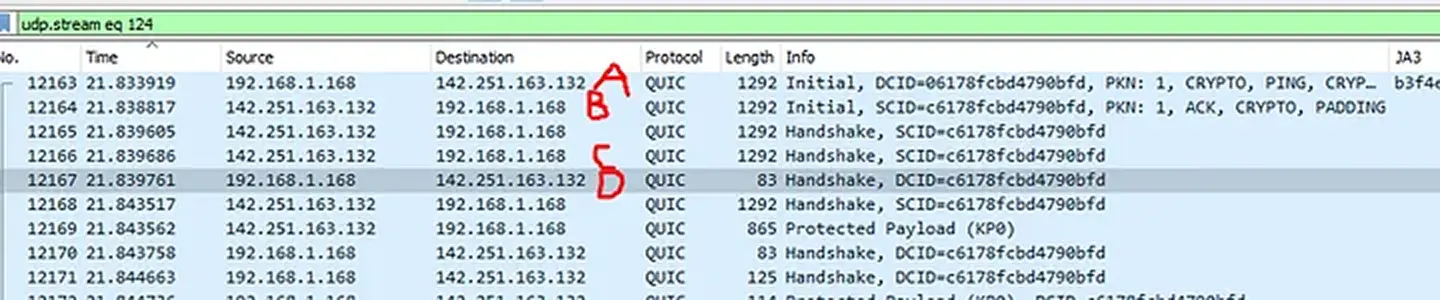
JA4L-C = {(D-C)/2}_Client TTL
JA4L-S = {(B-A)/2}_Server TTL
在上述示例中:
JA4L-C = 37_128
JA4L-S = 2449_42
距离测量:
借助 JA4L,我们可以用以下公式确定客户端与服务器之间的距离:
D = 距离
j = JA4L_a
c = 光纤中每微秒的光速(0.128 英里/µs 或 0.206km/µs)
p = 传播延迟因子
典型的传播延迟取决于地形以及涉及多少个网络。
- 差地形因子 = 2(山地、水域附近)
- 好地形因子 = 1.5(沿公路、海底光缆)
- SpaceX 因子 = …… 需要测试
我们可以用 TTL 来计算跳数,这有助于推断传播延迟因子。(下表是一个不错的起点,但还需要更多测试。)
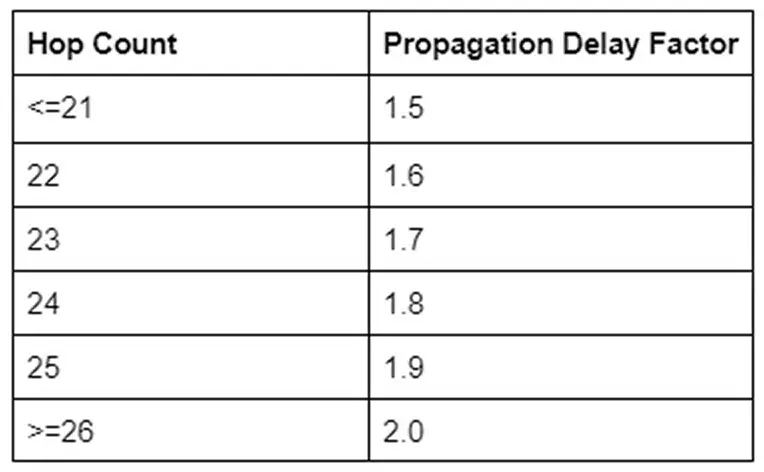
要计算一次连接经过的跳数,从其估计的初始 TTL 中减去观测到的 TTL。
- Cisco、F5、大多数网络设备使用 TTL 255
- Windows 使用 TTL 128
- Mac、Linux、手机和 IoT 设备使用 TTL 64
互联网上大多数路由的跳数少于 64 跳。因此,如果观测到的 TTL(JA4L_b)< 64,则估计的初始 TTL 为 64。在 65–128 之间,估计的初始 TTL 为 128。如果 TTL > 128,则估计的初始 TTL 为 255。
以 JA4L-S 为 2449_42 为例,观测到的 TTL 为 42 意味着初始 TTL 很可能是 64,即一台 Linux 服务器。64-42 给出跳数为 22。
我们可以得出结论:该服务器位于客户端 195 英里以内。服务器可能比这更近,但它在物理上不可能更远,因为光速是恒定的。如果同一主机有多个 JA4L,应取其中最低的值作为最准确的估计。
在此示例中,实际距离为 194 英里。
利用多个位置,可以被动地将任何客户端或服务器的物理位置三角定位到城市范围。更多内容见之后的博客文章……
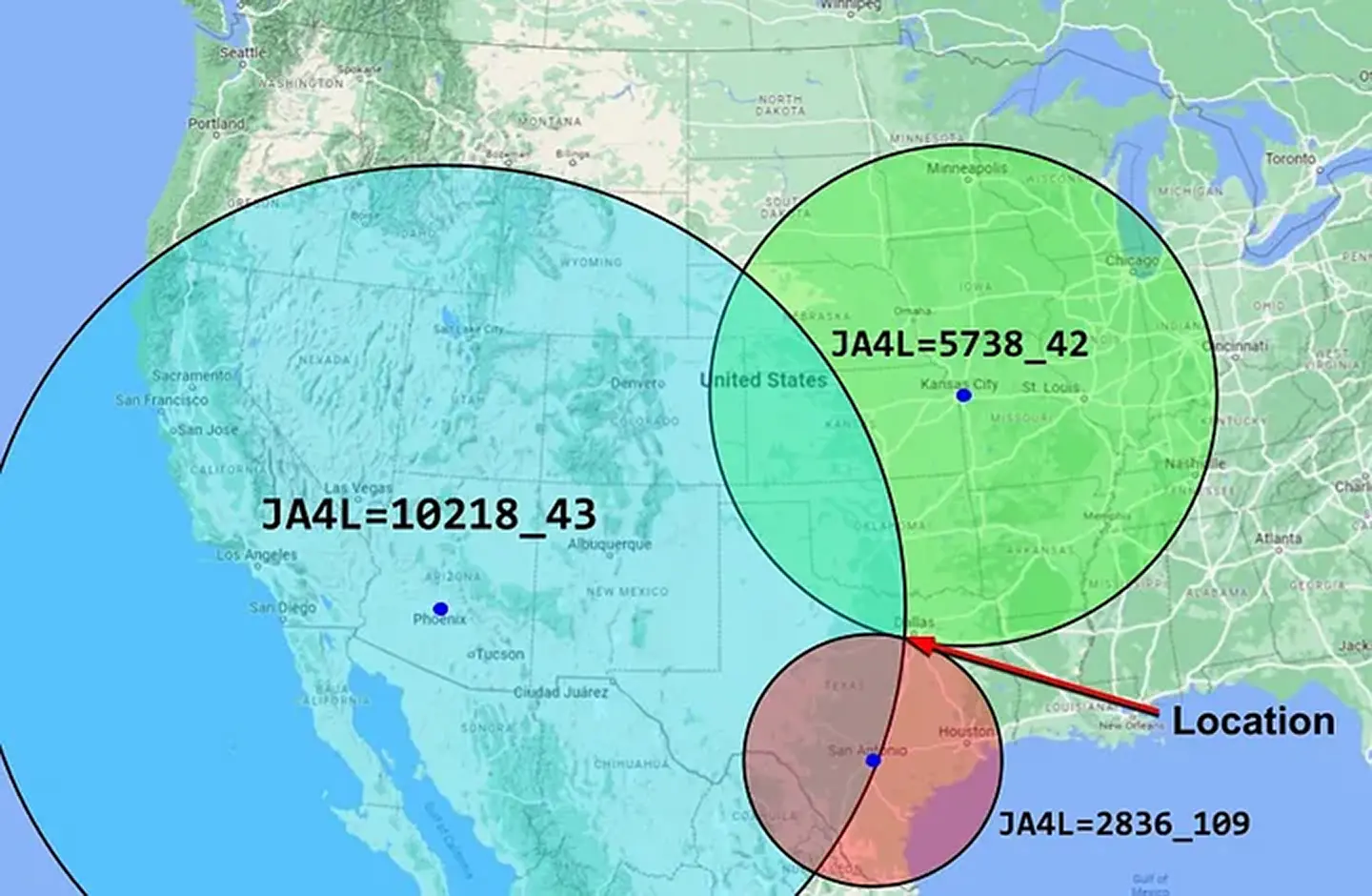
此外,JA4L_b(TTL)被动地有助于识别源操作系统,这是进行取证分析时极好的数据点。同时,由于 JA4L 着眼于第 3 层数据,它对加密和未加密的流量都有效。
在服务器端将 JA4 与 JA4H 和 JA4L 结合,使服务器应用程序能够识别会话劫持或中间人(MiTM)攻击。如果某个会话 Cookie(JA4H_d)突然改变了位置、操作系统(JA4L)和应用程序(JA4 与 JA4H_ab),那么撤销该会话令牌、要求用户用 MFA 重新登录就是合理的。使用这类逻辑时,应特别注意不要把特定指纹列入允许清单,因为应用程序会随时间变化,而应寻找剧烈的变化。darksail.ai 目前正在研究用 JA4+ 进行会话劫持检测。
JA4X:X509 TLS 证书指纹
JA4X 对 TLS 证书的生成方式进行指纹识别 —— 而不是证书内的值。这可以识别用于创建证书的应用程序和设置,在威胁狩猎中可能极其有用,因为威胁行为者会创建不同的证书,但倾向于用相同的方法来创建这些证书,因而具有相同的 JA4X 指纹。

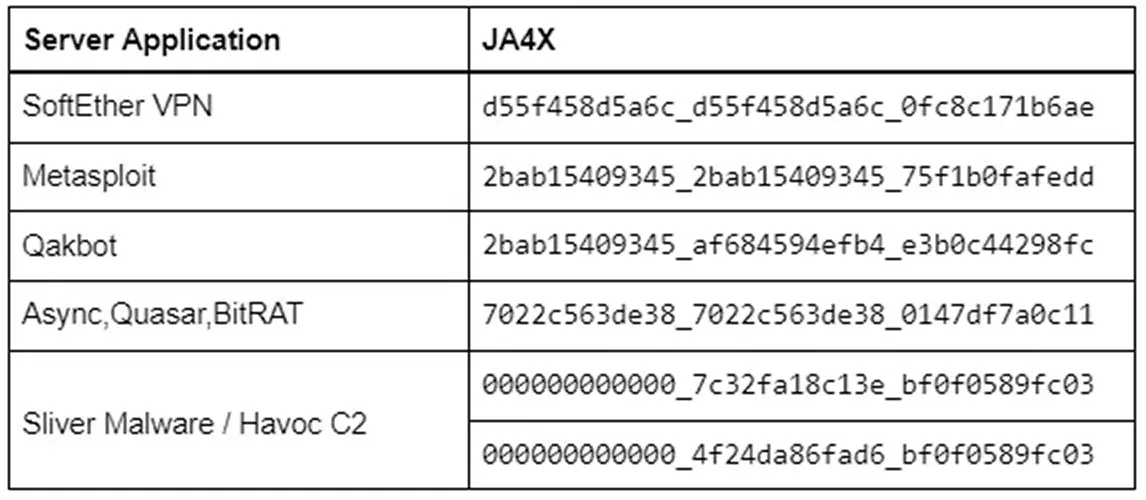
SoftEther VPN 被中国 APT 行为者 Flax Typhoon 大量用于入侵台湾基础设施,也被 Storm-0558 用于入侵美国政府电子邮件账户。据 Microsoft 称,很难将这些连接与合法的 HTTPS 流量区分开。然而,由于 SoftEther 生成其证书的方式是程序化的,JA4X 对 SoftEther 而言是独特的。如果把 JA4X 实现进防火墙,屏蔽发往 SoftEther VPN 的流量将变得轻而易举。而利用 JA4X 数据源,屏蔽来自 SoftEther VPN 的入站流量同样轻而易举。
大多数证书签发组织都会用相同的底层程序来生成和签发其所有证书。利用来自我们的朋友 Hunt.io 的、用 JA4X 丰富的互联网扫描数据,我们以签发者组织(Issuer Organization)= "Microsoft Corporation" 为例来看一看。
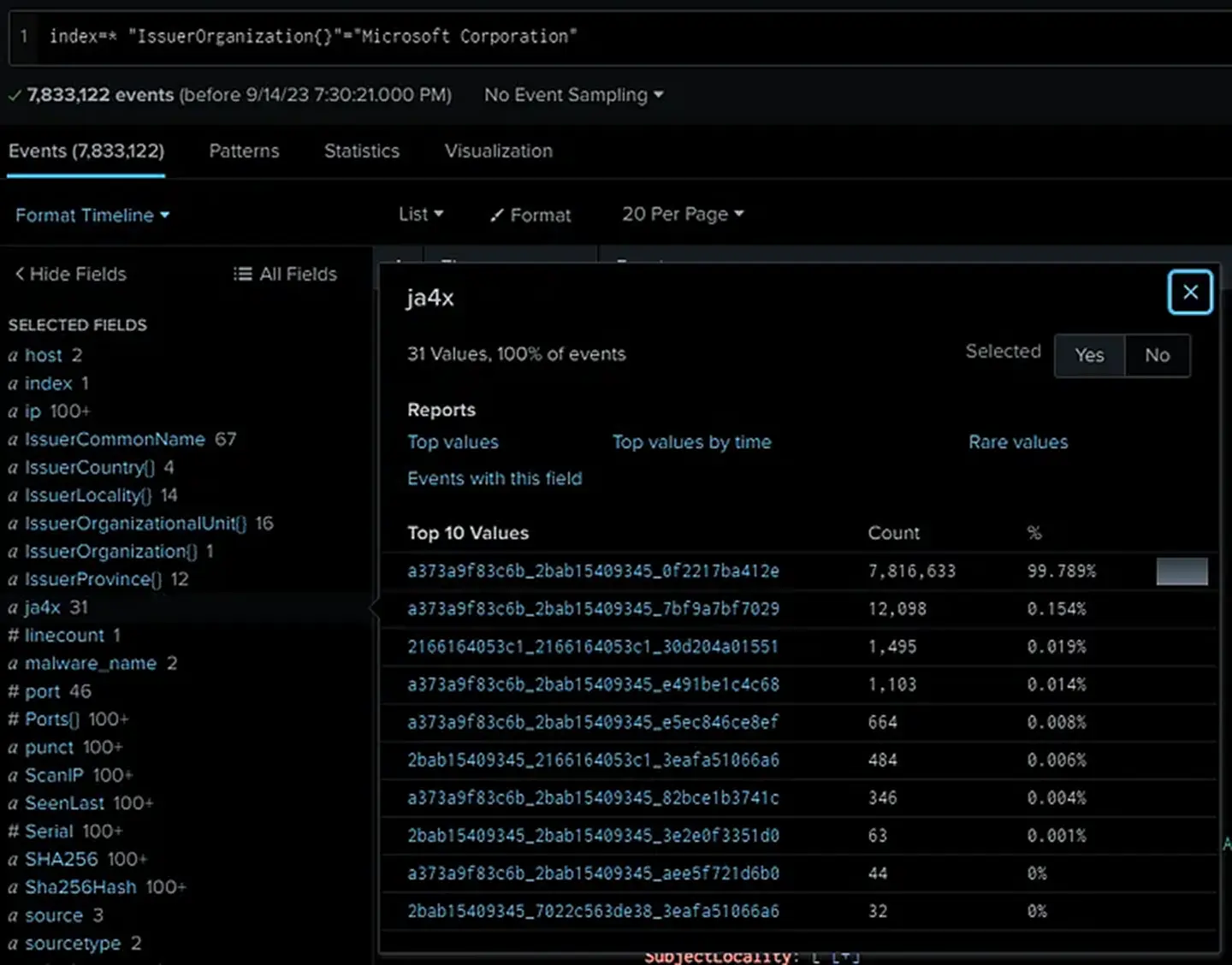
你可以看到,观测到的证书中有 99.8% 具有相同的 JA4X。下一个非常相似,但第三个看起来完全不同。让我们以这个异常为支点。
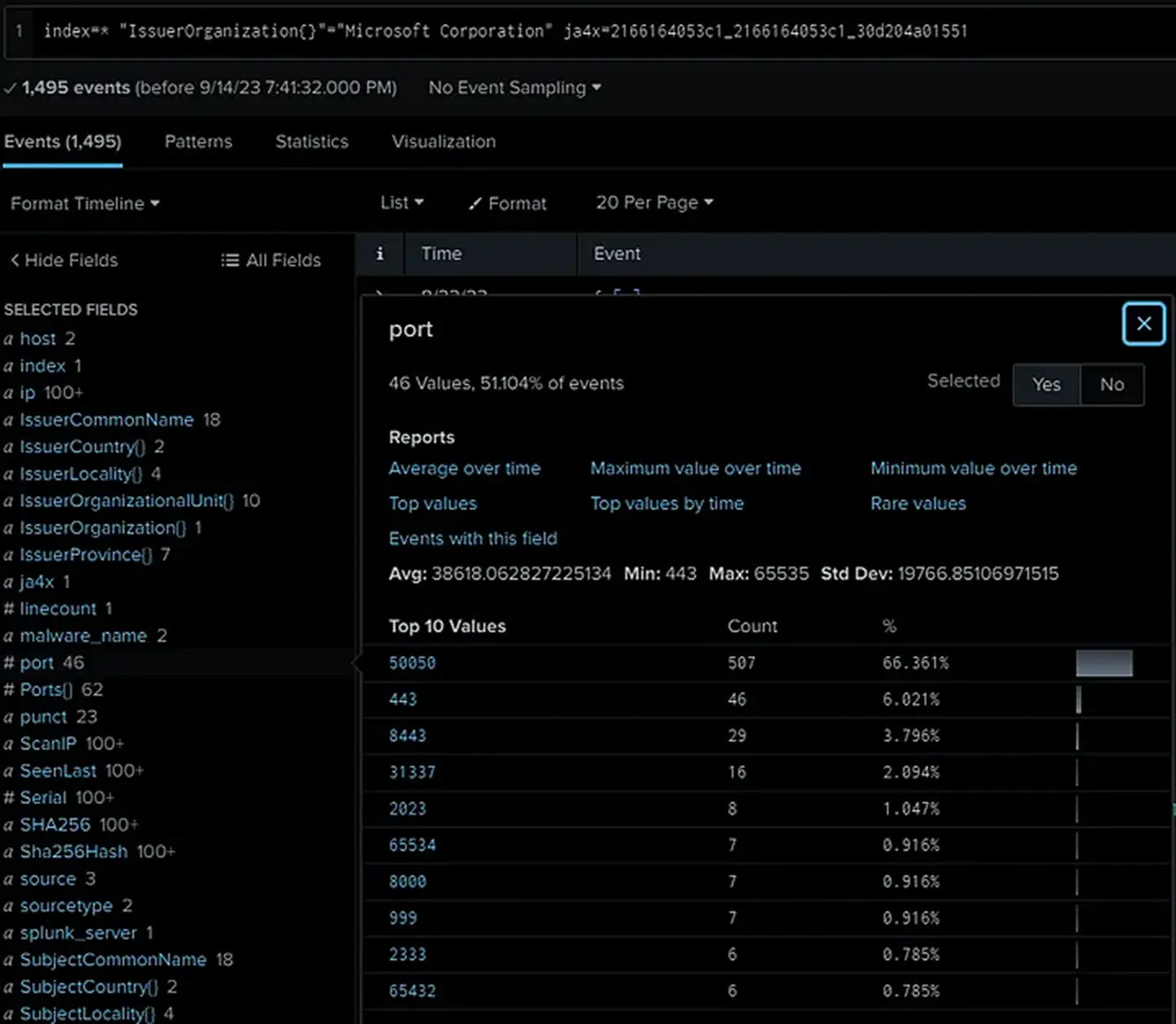
哦看,全是 Cobalt Strike!好吧,这很简单。
在互联网扫描数据上用 JA4X 进行狩猎极其强大,因为 JA4X 不是看证书内的值(在恶意软件的情形中这些值通常是随机生成的),而是看证书是如何生成的。
最后一个例子是 Sliver C2,它是一个较新的渗透测试框架,在流行度上正在取代 Cobalt Strike。像大多数优秀的渗透测试框架一样,Sliver 也被威胁行为者大量使用,因为它被设计得难以检测。
Sliver 有 400 多行代码专门用于随机生成 TLS 证书。因此,每个证书都是独特的,以证书哈希为支点将毫无结果。
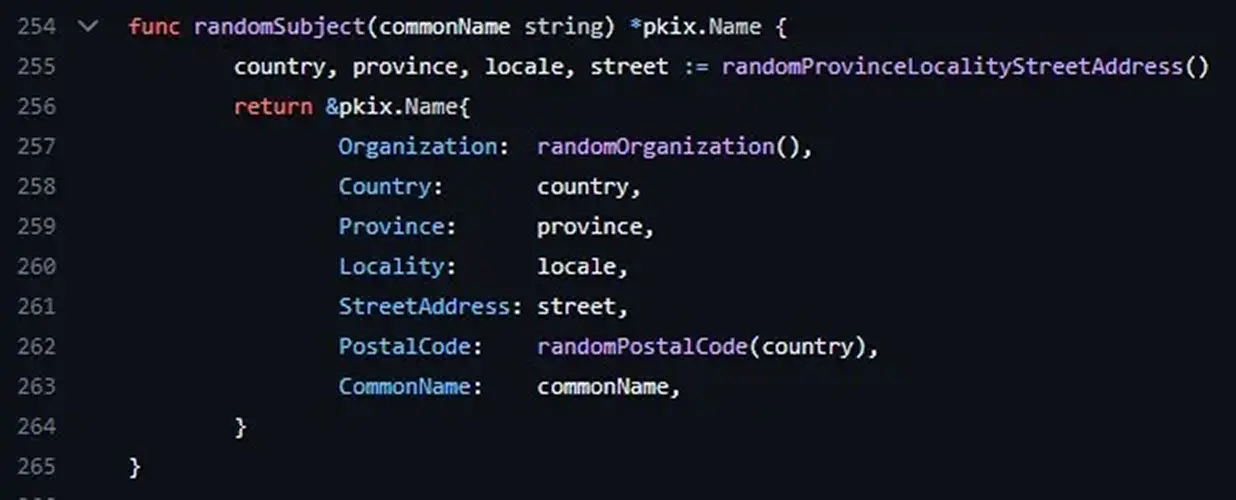
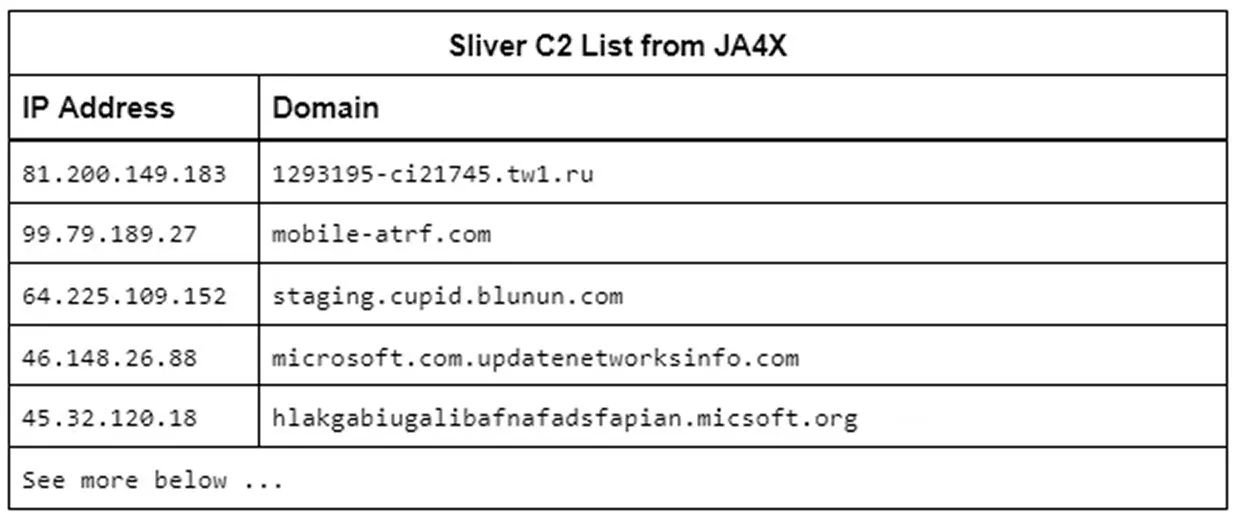
然而,每个证书也是由同一个应用程序生成的,因此具有相同的 JA4X。Havoc C2 使用了 Sliver 的大部分代码,所以它也有相同的 JA4X,但可以通过查看组织名(Org Name)和邮政编码(Postal Code)长度来区分。无论哪种情况,两者都是恶意软件,而 JA4X 在互联网上是独特的。我们的朋友 driftnet.io 提供一个 JA4X 数据源,借助它能够快速识别互联网上所有监听中的默认 Sliver C2。
这些例子展示了如何用 JA4X 检测和屏蔽发往 SoftEther、Tor、Metasploit、Sliver、Havoc、RAT C2 等的流量。请注意,TLS 证书在 TLS 1.2 中以明文发送,但在 TLS 1.3 中被加密,因此 JA4X 最适合在具备该级别检查能力的代理服务器、防火墙、MDR、NDR 和零信任应用上使用。JA4X 与 JA4、JA4S、JA4H 和 JA4L 结合时,可提供无与伦比的可见性与检测能力。用于互联网扫描时,JA4X 是进行支点分析、追捕恶意服务器的绝佳工具,尤其是与 JARM 数据结合时。
JA4SSH:SSH 流量指纹
JA4SSH 通过查看 SSH 包来对 SSH 会话进行指纹识别,并以可配置的滚动方式(默认每 200 个包)提供一个小的、简单的、易读的会话指纹。借助它,即使流量被加密,我们也能确定 SSH 连接内部正在发生什么,并为分析人员提供一组简单的指纹以供分析。
请注意,JA4SSH 对 SSH 会话进行指纹识别,而不是对 SSH 应用程序。对于 SSH 应用程序指纹识别,我建议你看看我的好朋友 Ben Reardon 的 HASSH。

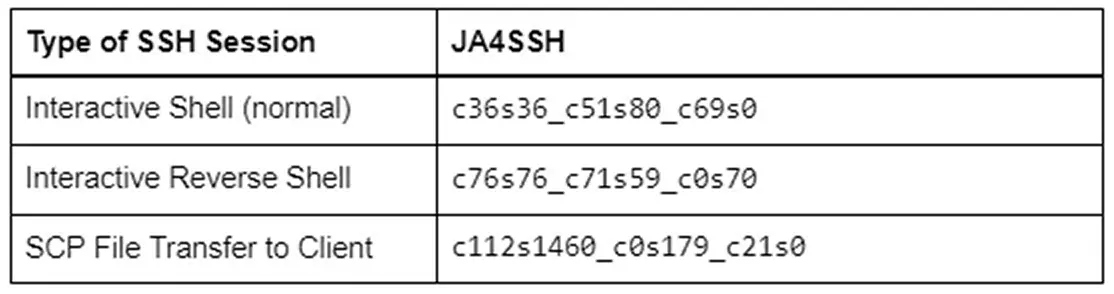
要理解 SSH 流量如何运作以及如何用流量分析识别隧道,我建议你阅读 Trisul.org 关于该主题的这些优秀博客(此处和此处)。
简言之,SSH 包会根据所使用的密码算法和 HMAC 被填充到特定长度。使用 chacha20-poly1305 时,这个长度最终为 36 字节。当客户端在 ssh 终端中键入一个字符时,该字符被加密,包被填充到 36 字节,然后发送给服务器。服务器会以同样字符的 36 字节包回应,这时该字符就显示在终端窗口中。客户端随后会发送一个 TCP ACK 包,告诉服务器它已完成前一次事务。因此,在终端中键入的客户端看起来是这样的:
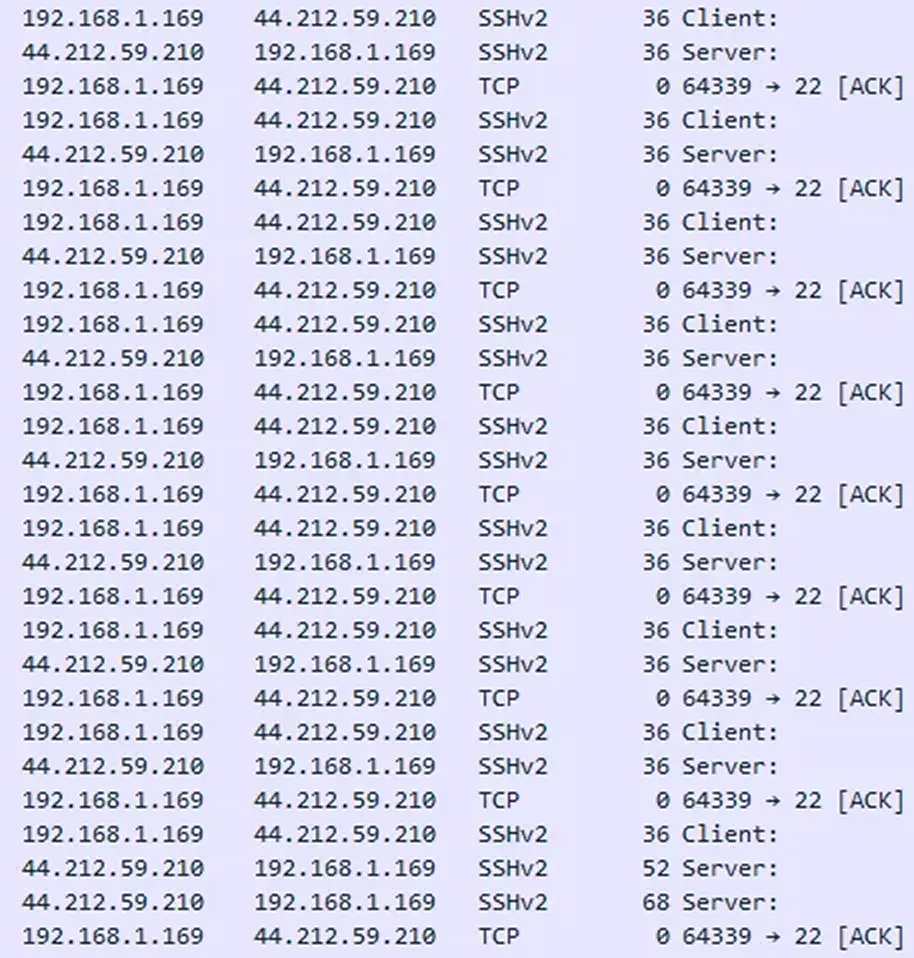
请注意,TCP ACK 来自发出 SSH 请求的一方(客户端),而服务器在底部返回命令的输出。这种情况的 JA4SSH 看起来像:c36s36_c51s80_c69s0。因此你会看到 36/36,且所有 ACK 都来自客户端,服务器一个都没发,由此我们可以很容易看出这是一个交互式正向 SSH 会话。
在反向 SSH shell 中,它是 SSH over SSH,所以包被双重填充 + HMAC。它看起来是这样的:
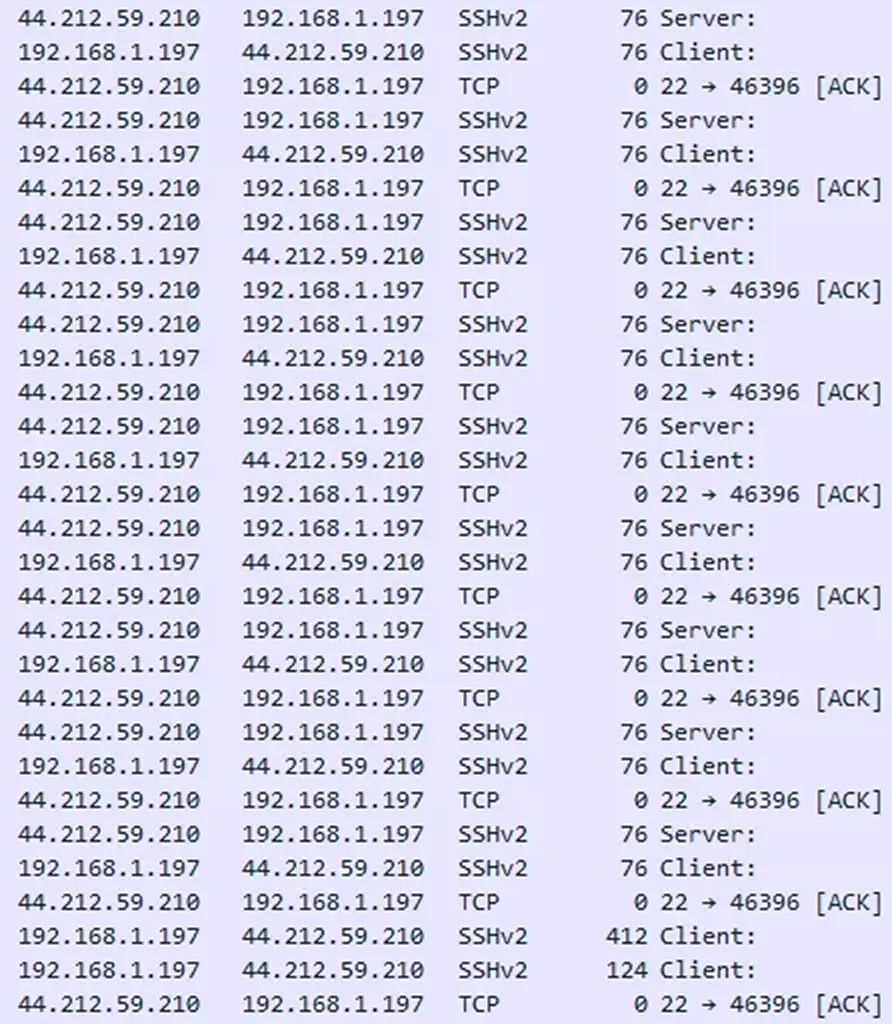
这种情况的 JA4SSH 看起来像:c76s76_c71s59_c0s70。我们可以清楚地看到常见的包长度 76/76(双重填充),且所有 ACK 都来自服务器,意味着是服务器端在键入。重要的是要注意,SSH 提供的是加密消息,而不是加密隧道,因此第 4 层包(TCP ACK 包)是以明文发送的。正是借助这些包,我们才能确定是哪一方在发起请求。利用 JA4SSH,现在检测反向 SSH shell 变得轻而易举。
在 SCP 文件传输中,TCP Length 被拉满,看起来像:
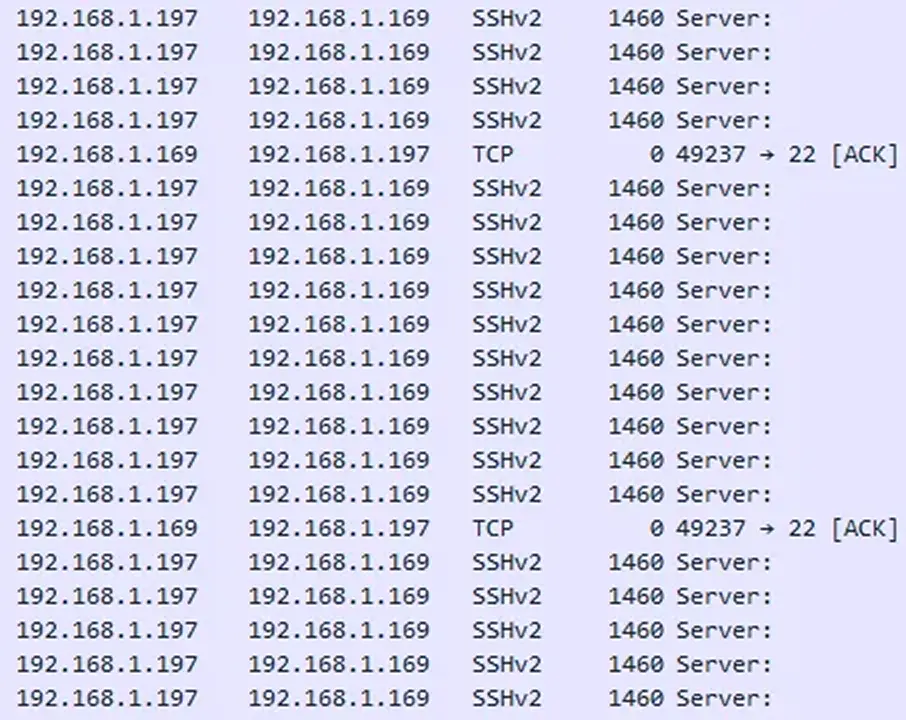
这种情况的 JA4SH 看起来像:c112s1460_c0s179_c21s0。注意被拉满的 s1460 窗口、所有 SSH 包都来自服务器、所有 TCP ACK 包都来自客户端。这很容易地表明客户端请求了一个文件,而服务器正在发送它。
在静态环境(如银行)中,文件每天在相同的系统之间通过 SFTP 传输,这些连接的 JA4SH 指纹应保持相似,任何重大偏差(例如看起来像交互式 shell)都值得告警。
JA4SSH 使检测某些类型的 SSH 活动变得容易,并以简单易懂的格式提供指纹。将 JA4SSH 与 JA4L 结合,可以获知客户端/服务器的距离以及各自的操作系统。
许可
JA4:TLS 客户端指纹是开源的,采用 BSD 3-Clause 许可,与 JA3 相同。这允许任何当前使用 JA3 的公司或工具立即升级到 JA4,无需等待。
JA4S、JA4L、JA4H、JA4X、JA4SSH 以及所有未来的新增项(统称 JA4+)采用 FoxIO License 1.1 许可。该许可对大多数用例是宽松的,包括学术和内部商业用途,但对变现(monetization)不宽松。例如,如果一家公司想在公司内部使用 JA4+ 来帮助保护自己的公司,这是允许的。例如,如果一家厂商想将 JA4+ 指纹识别作为其产品的一部分出售,则需要向我们申请 OEM 许可。
JA4+ 能够且正在被实现进开源工具,详见 License FAQ。
这种许可使我们能够以一种开放且立即可用的方式向世界提供 JA4+,同时也为我们提供了一种方式,来资助持续的支持、对新方法的研究,以及即将推出的 JA4+ 数据库的开发。我们希望每个人都有能力使用 JA4+,并乐于与厂商和开源项目合作,帮助实现这一点。
如果你的检测持续时间超过 4 小时,请立即联系你的供应商。
结论
JA4+ 提供了一套模块化的网络指纹,易于使用、易于分享。这些指纹的用例包括:扫描威胁行为者、恶意软件检测、会话劫持防护、合规自动化、位置追踪、DDoS 检测、威胁行为者分组、反弹 shell 检测,以及更多。JA4(TLS 客户端指纹)采用 BSD 3-Clause 许可,允许运行 JA3 的工具立即升级,而 JA4+(JA4S/L/H/X/SSH)采用 FoxIO License,对除变现外的大多数用例宽松,为此厂商需要购买 OEM 许可,而这正是资助进一步研究和 JA4 数据库(即将推出)开发的方式。我们计划大约每季度发布一种新的 JA4 方法,敬请关注。
JA4+ 可在此获取:https://github.com/FoxIO-LLC/ja4
如需许可或提问,请通过 www.fox-io.com 联系我们。
你可以通过 LinkedIn 或 Twitter/X 直接联系我。
JA4+ 由以下人士创建:
John Althouse
感谢以下人士的反馈:
Josh Atkins
Jeff Atkinson
Joshua Alexander
W.
Joe Martin
Ben Higgins
Andrew Morris
Chris Ueland
Ben Schofield
Matthias Vallentin
Valeriy Vorotyntsev
Timothy Noel
Gary Lipsky
以及 GreyNoise、Hunt、Google、ExtraHop、F5、Driftnet 等机构的工程师们。
In this blog I go over the new JA4+ network fingerprinting methods and examples of what they can detect.
TL;DR
In this blog I go over the new JA4+ network fingerprinting methods and examples of what they can detect.
JA4+ provides a suite of modular network fingerprints that are easy to use and easy to share, replacing the JA3 TLS fingerprinting standard from 2017. These methods are both human and machine readable to facilitate more effective threat-hunting and analysis. The use-cases for these fingerprints include scanning for threat actors, malware detection, session hijacking prevention, compliance automation, location tracking, DDoS detection, grouping of threat actors, reverse shell detection, and many more.
More fingerprints are in development and will be added to the JA4+ family as they are released.
UPDATE: Click here for the JA4T/S/Scan — TCP Fingerprinting blog.
JA4+ is available here: https://github.com/FoxIO-LLC/ja4
What is JA4+
JA4+ is a set of simple yet powerful network fingerprints for multiple protocols that are both human and machine readable, facilitating improved threat-hunting and security analysis. If you are unfamiliar with network fingerprinting, I encourage you to read my blogs releasing JA3 here, JARM here, and this excellent blog by Fastly on the State of TLS Fingerprinting which outlines the history of the aforementioned along with their problems. JA4+ brings dedicated support, keeping the methods up-to-date as the industry changes. Additionally, and by popular demand, an official JA4+ database of fingerprints, associated applications and recommended detection logic is in the process of being built.
All JA4+ fingerprints have an a_b_c format, delimiting the different sections that make up the fingerprint. This allows for hunting and detection utilizing just ab or ac or c only. If one wanted to just do analysis on incoming cookies into their app, they would look at JA4H_c only. This new locality-preserving format facilitates deeper and richer analysis while remaining simple, easy to use, and allowing for extensibility.
In this blog we are releasing JA4/S/H/L/X/SSH, or JA4+ for short. More fingerprints are in development and will be added to the JA4+ family as they are released.
JA4: TLS Client Fingerprint
TLS is used to encrypt the vast majority of traffic on the internet, from web browsing to streaming, to IoT usage analytics. Even malware uses TLS to hide its malicious communications. At the beginning of a TLS connection, the client sends a TLS Client Hello packet which is sent in the clear, prior to encrypted communication. This packet, generated by the client application, informs the server of what ciphers it supports as well as its preferred method of communication. As such, the TLS Client Hello packet is unique per application or its underlying TLS library.
JA4 looks at this TLS Client Hello packet and builds out an easily understandable and shareable fingerprint. The format is as follows:
JA4 fingerprints the client, no matter if the traffic is over TCP or QUIC. QUIC is the protocol used by the new HTTP/3 standard that encapsulates TLS 1.3 into UDP packets. As QUIC was developed by Google, if an organization heavily utilizes Google products, QUIC could make up half of their network traffic, so this is important to capture.
JA4 also clearly shows the ALPN (Application-Layer Protocol Negotiation). This represents the protocol that the application wants to communicate in after the TLS negotiation is complete. “h2” = HTTP/2, “h1” = HTTP/1.1, “dt” = DNS-over-TLS, etc. A full list of possible ALPNs can be found here. A “00” here denotes the lack of ALPN. Note that the presence of ALPN “h2” does not indicate a browser as many IoT devices communicate over HTTP/2. However, the lack of an ALPN may indicate that the client is not a web browser.
More technical details for implementation and what the raw (unhashed) fingerprint looks like can be found on the github page.
Even though the traffic is encrypted over TLS 1.3, we are still able to gain a huge amount of valuable information about the client application. Remember that most custom applications will have the fingerprint of their underlying TLS libraries. So a program written in Go will likely have a JA4 that matches other Go programs. The same is true for Python, Java, etc., while custom programs like VPN clients, Steam, Slack, and Windows functions will be unique.
JA4 can be extremely valuable in production networks where applications are largely static. If you are running an all Linux infrastructure, then a Windows JA4 fingerprint would be worth looking into. If you’re running only Exchange servers, then a sudden python JA4 fingerprint would be worth looking into. JA4 makes for a great pivot point in analysis when trying to understand network traffic and the a_b_c format allows for deeper analysis.
For example; GreyNoise is an internet listener that identifies internet scanners and is implementing JA4+ into their product. They have an actor who scans the internet with a constantly changing single TLS cipher. This generates a massive amount of completely different JA3 fingerprints but with JA4, only the b part of the JA4 fingerprint changes, parts a and c remain the same. As such, GreyNoise can track the actor by looking at the JA4_ac fingerprint (joining a+c, dropping b).
JA4S: TLS Server/Session Fingerprint
After a client sends its TLS Client Hello packet, the server will respond with its TLS Server Hello packet. This packet, also sent in the clear, is formulated based on the server’s selection of available options in the Client Hello. This includes the one cipher chosen out of the list of available options, and any extensions the server wishes to set.
As such, the Server Hello is unique to both the server application and the Client Hello that was sent to it. A different Client Hello may cause a different Server Hello, and therefore a different JA4S, from the same server. However, the same Client Hello will always produce the same Server Hello from that server application. For example if the client sends JA4=a_b_c and the server responds with JA4S=d_b_e, that server will always respond to a_b_c with d_b_e. But if another application sends a different client hello to that same server, say JA4=x_y_z, the server will respond with a different server hello, JA4S=t_y_v. So it’s a different response to different applications but always the same response to the same application. I go into more detail on this in my JA3S blog post.
Example JA4 and JA4S combinations
JA4S, when combined with JA4, significantly increases detection fidelity. Going from merely identifying underlying libraries of a client to identifying the client or malware family. Beyond application identification, one could look at just JA4S_b to understand what ciphers are being used on any given network to ensure it is meeting compliance requirements. All of this is possible without breaking encryption.
JA4H: HTTP Client Fingerprint
JA4H fingerprints the HTTP client based on each HTTP request. As most traffic is encrypted, JA4H is best utilized on servers, proxies, WAFs, TLS terminating load balancers, and environments where TLS is decrypted. However, JA4H is still valuable even in environments where TLS is not decrypted because a lot of devices and programs, including malware, still communicate over HTTP. The IcedID malware dropper, for example, doesn’t use TLS. These malware programs are very easy to fingerprint.
JA4H_ab are a fingerprint of the application for the given HTTP method used. The lack of an Accept-Language is a clear indication that the application is not human interactive, ergo a bot.
JA4H_c is a fingerprint of the cookie and will be different for each website visited but will be the same for that website or application. For example, every Plex server or Okta server will produce the same JA4H_c.
JA4H_d is a fingerprint of the user and will be different per user. This allows for tracking of a user through a website without logging SPII, thereby keeping the logging system GDPR compliant.
More details on the technical implementation can be found on our github.
On the server side, one could use JA4H_c as a hunting method. As the server is specifying which cookie fields the client should use, all clients should have the same JA4H_c. Discrepancies here merit looking into. One could also track a user with JA4H_d and their client application with JA4H_ab or identify bots with just JA4H_ab.
On the client side (proxy, NDR, zero trust), JA4H combined with JA4 and JA4S allow for extremely high fidelity application and malware detection.
There are a lot of use cases for JA4H, especially when combined with the rest of JA4+. I’ll cover all of them in more detail in a later blog post.
JA4L: Light Distance Locality
JA4L measures the distance between a client and a server by looking at the latency between the first few packets in a connection. We use the first few packets because these are low-level machine generated, so there is nearly zero processing delay in creating and sending these packets. Time is measured in microseconds (µs), 1ms = 1000µs, as microseconds are a standard unit of time measurement in packet captures.
If JA4L is running server side, this will measure the distance of the client from the server and if this is running client side, this will measure the distance of the server from the client. If this is running on a network tap, it will measure the distance of each from the network tap location.
JA4L is split up into 2 measurements, client and server. For TCP, these are determined by looking at the TCP 3-way handshake. UDP, we’re looking at the QUIC handshake.
JA4L-C = {(C-B)/2}_Client TTL
JA4L-S = {(B-A)/2}_Server TTL
In the above example:
JA4L-C = 11_128
JA4L-S = 1759_42
JA4L-C = {(D-C)/2}_Client TTL
JA4L-S = {(B-A)/2}_Server TTL
In the above example:
JA4L-C = 37_128
JA4L-S = 2449_42\
Distance Measurement:
With JA4L we can determine the distance between the client and server using this formula:
D = Distance
j = JA4L_a
c = Speed of light per µs in fiber (0.128 miles/µs or 0.206km/µs)
p = Propagation delay factor
Typical propagation delay depends on terrain and how many networks are involved.
Poor terrain factor = 2 (around mountains, water)
Good terrain factor = 1.5 (along highway, under sea cables)
SpaceX factor = … needs to be tested
We can use the TTL to calculate the hop count, which can help inform the propagation delay factor. (The table below is a good starting point but more testing needs to be done.)
To calculate the number of hops a connection went through, subtract the TTL from its estimated initial TTL.
Cisco, F5, most networking devices use a TTL of 255
Windows uses a TTL of 128
Mac, Linux, phones, and IoT devices use a TTL of 64
Most routes on the Internet have less than 64 hops. Therefore if the observed TTL, JA4L_b, is <64, the estimated initial TTL is 64. Within 65–128, the estimated initial TTL is 128. And if the TTL is >128 then the estimated initial TTL is 255.
With a JA4L-S of 2449_42, the observed TTL of 42 means the initial TTL was likely 64, a Linux server. 64-42 gives us a hop count of 22.
We can conclude that this server is within 195 miles of the client. The server may be closer than this, but it is physically impossible for it to be farther away as the speed of light is constant. If there are multiple JA4Ls for the same host, the lowest value should be taken as the most accurate.
In this example, the actual distance was 194 miles.
Utilizing multiple locations, one can passively triangulate the physical location of any client or server down to a city area. More on this in a later blog post…
Additionally, JA4L_b (TTL) passively facilitates the identification of source operating systems which is an excellent data point to have when performing forensic analysis. Also, because JA4L is looking at Layer 3 data, it works on encrypted and unencrypted traffic.
Combining JA4 with JA4H and JA4L on the server side makes it possible for the server application to identify session hijacking or MiTM attacks. If a session cookie (JA4H_d) were to suddenly change locations, operating systems (JA4L), and application (JA4 and JA4H_ab), then it would make sense to revoke the session token, asking the user to log back in with MFA. With this type of logic, special care should be taken to not allowlist particular fingerprints as applications will change over time, but instead to look for dramatic changes. Session hijacking detection with JA4+ is something darksail.ai is working on right now.
JA4X: X509 TLS Certificate Fingerprinting
JA4X fingerprints the way in which TLS certificates are generated — not the values within the certificate. This can identify applications and settings used to create the certificate which can be extremely useful in threat hunting as threat actors will create different certificates but tend to use the same methods to create said certificates, thereby having the same JA4X fingerprint.
SoftEther VPN was heavily utilized by Chinese APT actors, Flax Typhoon, to compromise Taiwan infrastructure, and Storm-0558 in the hacking of US Government Email accounts. According to Microsoft, it is very difficult to differentiate these connections from legitimate HTTPS traffic. However, because of the programmatic way that SoftEther generates its certificates, the JA4X is unique to SoftEther. If JA4X were to be implemented into a firewall, blocking traffic to SoftEther VPNs would be trivial. And by utilizing a JA4X feed, blocking inbound traffic from SoftEther VPNs would be trivial as well.
Most certificate issuing organizations will use the same underlying program to generate and sign all of their certificates. Using Internet scan data enriched with JA4X from our friends at Hunt.io, we can take a look at Issuer Organization = “Microsoft Corporation” as an example.
You can see that 99.8% of observed certificates have the same JA4X. The next one down is very similar, but the third one looks completely different. Let’s pivot on this anomaly.
Oh look, it’s all Cobalt Strike! Well, that was easy.
Hunting with JA4X on Internet scan data is extremely powerful because rather than looking at the values within a certificate, which, in the case of malware, are usually randomly generated, JA4X looks at how the certificate was generated.
One final example is Sliver C2, which is a newer pentesting framework that is replacing Cobalt Strike in popularity. Like most good pentesting frameworks, Sliver is also heavily utilized by threat actors as it is designed to be difficult to detect.
Sliver has over 400 lines of code dedicated to randomly generating TLS certificates. As such, each certificate is unique and pivoting on a certificate hash will yield no results.
However, each certificate is also generated by the same application and therefore has the same JA4X. Havoc C2 uses most of the Sliver code so it too has the same JA4X, but can be differentiated by looking at the Org Name and Postal Code length. In either case, both are malware and the JA4X is unique on the Internet. Our friends at driftnet.io offer a JA4X feed and, with it, were able to quickly identify all default Sliver C2s listening on the Internet.
These examples show how JA4X can be used to detect and block traffic to SoftEther, Tor, Metasploit, Sliver, Havoc, RAT C2s, etc. Note that TLS certificates are sent in the clear in TLS 1.2, but are encrypted in TLS 1.3 so JA4X is best utilized on Proxy servers, Firewalls, MDR, NDR and Zero Trust applications that have that level of inspection. JA4X, when combined with JA4, JA4S, JA4H and JA4L provides an unparalleled level of visibility and detection capability. When used in internet scanning, JA4X is an excellent tool for pivot analysis and hunting down malicious servers, especially when combined with JARM data.
JA4SSH: SSH Traffic Fingerprinting
JA4SSH fingerprints SSH sessions by looking at SSH packets and providing a small, simple, easy-to-read fingerprint of the session on a configurable rolling basis, every 200 packets by default. With this, we are able to determine what is happening within the SSH connection, even though the traffic is encrypted, and provide an analyst with a simple set of fingerprints for their analysis.
Note that JA4SSH fingerprints the SSH session, not the SSH applications. For SSH application fingerprinting, I recommend you take a look at HASSH, by my good friend Ben Reardon.
To understand how SSH traffic works and how to identify tunnels using traffic analysis, I recommend you read these excellent blogs on the subject by Trisul.org here and here.
In short, SSH packets are padded out to a particular length depending on the cipher algorithm and HMAC used. With chacha20-poly1305, that ends up being 36 bytes. When the client types a character into the ssh terminal, that character is encrypted with the packet padded to 36 bytes and then sent to the server. The server will respond with the same character in a 36 byte packet and that’s when the character is displayed in the terminal window. The client will then send a TCP ACK packet to tell the server that they’re done with the previous transaction. Because of this, a client typing in a terminal will look like this:
Notice that the TCP ACKs are coming from the side doing the SSH requests (client) and the server returns the output of the command at the bottom. The JA4SSH for this looks like: c36s36_c51s80_c69s0. So you see 36/36 and all the ACKs are from the client, the server has sent none, so from these we can easily see that it is an interactive forward SSH session.
In a reverse SSH shell, it’s SSH over SSH so the packets are double padded + HMAC. Here’s what it looks like:
The JA4SSH for this looks like: c76s76_c71s59_c0s70. We can clearly see a common packet length of 76/76, double padded, and all of the ACKs are coming from the server, meaning it is the server side that is doing the typing. It’s important to note that SSH provides encrypted messages, not an encrypted tunnel, so layer 4 packets, the TCP ACK packets, are sent in the clear. It is with these that we are able to determine which side is initiating the requests. By utilizing JA4SSH, it is now trivial to detect reverse SSH shells.
In a SCP file transfer, the TCP Length is maxed out and looks like:
The JA4SH for this looks like: c112s1460_c0s179_c21s0. Notice the maxed out window of s1460, that all SSH packets are coming from the server and all TCP ACK packets are coming from the client. This easily shows that the client requested a file and the server is sending it.
In static environments, like banks, where files are transferred over SFTP between the same systems every day, the JA4SH fingerprints of those connections should remain similar and any major deviation, such as looking like an interactive shell, would be worth alerting on.
JA4SSH makes it easy to detect certain types of SSH activity and delivers fingerprints in a format that is simple to understand. Combining JA4SSH with JA4L can inform the distance of the client/server as well as the operating system of each.
Licensing
JA4: TLS Client Fingerprinting is open-source, BSD 3-Clause, same as JA3. This allows any company or tool currently utilizing JA3 to immediately upgrade to JA4 without delay.
JA4S, JA4L, JA4H, JA4X, JA4SSH, and all future additions, (collectively referred to as JA4+) are licensed under the FoxIO License 1.1. This license is permissive for most use cases, including for academic and internal business purposes, but is not permissive for monetization. If, for example, a company would like to use JA4+ internally to help secure their own company, that is permitted. If, for example, a vendor would like to sell JA4+ fingerprinting as part of their product offering, they would need to request an OEM license from us.
JA4+ can and is being implemented into open source tools, see the License FAQ for details.
This licensing allows us to provide JA4+ to the world in a way that is open and immediately usable, but also provides us with a way to fund continued support, research into new methods, and the development of the upcoming JA4+ Database. We want everyone to have the ability to utilize JA4+ and are happy to work with vendors and open source projects to help make that happen.
If you experience a detection lasting longer than 4 hours, contact your vendor right away.
Conclusion
JA4+ provides a suite of modular network fingerprints that are easy to use and easy to share. The use-cases for these fingerprints include scanning for threat actors, malware detection, session hijacking prevention, compliance automation, location tracking, DDoS detection, grouping of threat actors, reverse shell detection, and many more. JA4 (TLS Client Fingerprinting), is licensed under BSD 3-Clause, allowing tools running JA3 to immediately upgrade, while JA4+ (JA4S/L/H/X/SSH) is under the FoxIO License, which is permissive for most use cases except monetization, for that the vendor would need to purchase an OEM license which is what funds further research and the development of the JA4 database (coming soon). We plan to release a new JA4 method about once per quarter so stay tuned.
JA4+ is available here: https://github.com/FoxIO-LLC/ja4
For licensing or questions, reach out to us at www.fox-io.com
You can reach me directly on LinkedIn or Twitter/X.
JA4+ was created by:
John Althouse
With feedback from:
Josh Atkins
Jeff Atkinson
Joshua Alexander
W.
Joe Martin
Ben Higgins
Andrew Morris
Chris Ueland
Ben Schofield
Matthias Vallentin
Valeriy Vorotyntsev
Timothy Noel
Gary Lipsky
And engineers working at GreyNoise, Hunt, Google, ExtraHop, F5, Driftnet and others.